Showing posts with label "data collection". Show all posts

Saturday, October 18, 2014

New "Send Forms" Options in Google Forms

Google has been putting in some very functional upgrades lately.  If you are a Google Forms user, you've probably noticed quite a few.  I really like Google Forms and think teachers will love it.  I noticed a few new changes on the Send Forms button information lately.


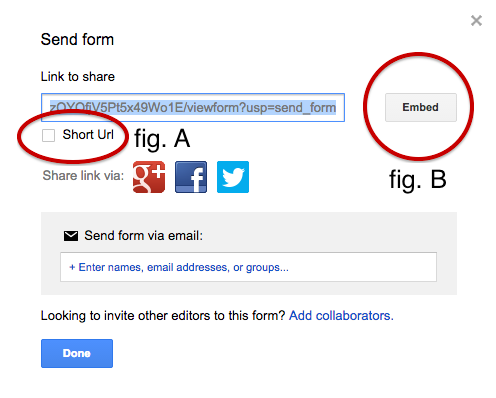
I noticed that Google now provides a URL shortener on the Send Form window (fig. A).  It automatically will shorten those extremely long URLs to one with the "goo.gl" address.  This is great for people that are sharing the link without having to go somewhere else to find it - like posting your link on a website or email.  Great way to get a group to use their own devices to take a survey or answer some questions.  How about having students use their smartphones - YEA!

Also, Google has added a button that will give you the embed code (fig. B).  This is awesome, so you can embed the survey right on your webpage.  That way, the user doesn't have to leave the page they are on to go take a Form.

Besides the changes, you can still post your link on Google+, Twitter, or Facebook, or even email the people you want to take the Form.

Google Forms are an outstanding way to collect information from people and organize it in an easy way to analyze.  Give them a try.

Wednesday, February 23, 2011

Poll Everywhere - Data Collection


I recently signed up for an account with Poll Everywhere, so I could see if it provided data feedback that could be easily accessed and set up.  I am going to give it a try with a poll at a presentation I am conducting this weekend.  Poll Everywhere is easy to setup, and provides the audience with three ways to send in their response.  Audience members can send their choice by text message, by tweeting to an account, or by accessing a website.  Because of it's flexibility, it should be easy and convenient for audience members to find a way to reply to the questions.

Poll Everywhere compiles the data live, so you can see the responses come in.  You can do multiple choice questions, T/F questions, or open-ended questions.  With upgrades to your account, you can even mediate the responses before they are displayed on the screen.  I think it will be interesting to see which online tools my attendees use most frequently - it will allow me to adjust how much time I spend on each tool.  It would be a nice way for teachers to obtain data from students, to help guide where more instruction is needed.

Poll Everywhere also provides educators with extra benefits, as well as discounted pay accounts.  They have K-12 accounts, Higher Ed accounts, as well as whole-school and district accounts.  Each provides added controls and features, but I am trying the free teacher account.  I can poll 32 people (which should more than cover my session - unless people read this and come see how it goes).

I'll write back later to share my thoughts and results.