Today, I had the opportunity to work with our IB Art Teacher, Kate Menke, as she is implementing blogs with her students. We are working on creating blogs with the students so that they begin to develop an online digital portfolio. They are going to display their work and explanations, as well as demonstrate their critical skills with comments on the other students' work. These students will be able to follow each other and see the growth over the years. I believe it is the start of something awesome for these students.
Early in our process, we talked about digital footprint, and what that means for these students. We talked about what the world can see about them and that it is important for them to share all of the incredible work that they do with society. It is important that they display their work in ways that impress the readers, whether it is classmates, teachers, family, friends, or anyone else that may find their work. We also talked about the permanence of their work and that what they post is a permanent statement to world. Also, part of this discussion was the need to be good digital citizens. They discussed the need to be honest and sincere, thoughtful and kind.
We then talked about the steps necessary to create a Blogspot blog. We went through the following presentation and talked about the importance of keeping their profiles empty and keeping the amount of personal information shared to a minimum. We stressed the importance of the students moderating their comments, so that comments that are questionable can be discussed before going out to the world. It was a nice process and one that the students will actually go through in the next few days. The students seemed so excited to get going.
We have involved the parents in this whole process. It is important to us to have everyone on the same page as we move forward in this project. The teacher is excited. The students are excited. And, I am excited to see how this goes. I believe the students will grow incredibly throughout this process and they will end up with a product that they can be proud of and show off.
Thursday, November 4, 2010


Sunday, October 31, 2010

Thursday, October 28, 2010
Using the Necessary Tool
Who would've thought I would need the cassette tape deck that was on the shelf in my back storage room? I recently had a student ask me if there was way to transfer his old cassette tapes to his mp3 player. I had to think for a minute, then realized that my cassette dubbing deck was there. We got it down, dusted it off, and connected it to the computer in the work room. What a way to preserve these old recordings that provide information that the student needs.
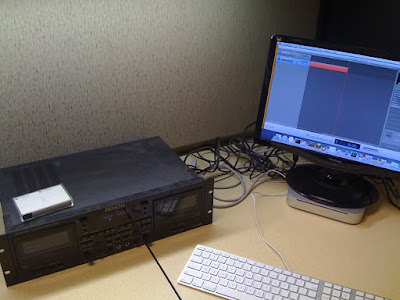
By utilizing Garage Band on the mac mini, the student was able to record the cassettes digitally on the computer. He was able to edit out the long pauses, and then share out the files as mp3s. He could take them home with his USB flash drive and import them into his iTunes account. He was so happy that he could hear these old cassettes. His uncle thinks he will enjoy the cassettes and that he could learn some new things. Now he can actually use them in a technology form he possesses.
My word of advice? Don't give up on some of those old gadgets that are lying around. There may be a use for them someday. You never know what tool you will need. My student is sure glad we hadn't sent that deck to the warehouse for storage. He is actually thinking of bringing in more of these recordings. Old school meets new school. Glad I could help.

By utilizing Garage Band on the mac mini, the student was able to record the cassettes digitally on the computer. He was able to edit out the long pauses, and then share out the files as mp3s. He could take them home with his USB flash drive and import them into his iTunes account. He was so happy that he could hear these old cassettes. His uncle thinks he will enjoy the cassettes and that he could learn some new things. Now he can actually use them in a technology form he possesses.
My word of advice? Don't give up on some of those old gadgets that are lying around. There may be a use for them someday. You never know what tool you will need. My student is sure glad we hadn't sent that deck to the warehouse for storage. He is actually thinking of bringing in more of these recordings. Old school meets new school. Glad I could help.
Wednesday, October 13, 2010
Sharing What You Know and Learn
I recently viewed the K12 Online Conference 2010 Pre-Conference Keynote by Dean Shareski. He talks about our need to share what we learn and to share it freely with others. His talk, entitled Sharing - The Moral Imperative, speaks to what we can learn from others if we open the doors of communication and utilize the technology that is available all around us. It was a conversation that I had with Dean that motivated me to start this blog, and share what I know and learn with others. We are forever indebted to many people for what we know. We need to give back. Our students will benefit greatly from the stories and experiences we can share with them.
Dean talks about his PLN and how he learns from people all over the world. Why are we restricted to the teachers in our buildings or in our districts? We have the ability to learn and collaborate with teachers from all over the world. He shares stories of the work of math teacher Dan Meyer, who shares his math lessons through is blog online. Dan's sharing helped another teacher from Scotland, who was using Dan's authentic lessons to help teach his students mathematical concepts.
It is our duty to share what we learn and what we find. I hope you enjoy this video from Dean and the K12 Online Conference. Visit the conference site and join in the learning. It will prove to be a rich experience, I am sure.
Dean talks about his PLN and how he learns from people all over the world. Why are we restricted to the teachers in our buildings or in our districts? We have the ability to learn and collaborate with teachers from all over the world. He shares stories of the work of math teacher Dan Meyer, who shares his math lessons through is blog online. Dan's sharing helped another teacher from Scotland, who was using Dan's authentic lessons to help teach his students mathematical concepts.
It is our duty to share what we learn and what we find. I hope you enjoy this video from Dean and the K12 Online Conference. Visit the conference site and join in the learning. It will prove to be a rich experience, I am sure.
Tuesday, October 12, 2010
RunKeeper - nice application, website

I recently started using RunKeeper to keep track of my running distances and times. I had seen a friend of mine using it and it looked interesting, so I had to investigate. I found out that RunKeeper.com is not only a physical fitness tracking site, but also a social site that can help you keep track of others that are utilizing the site. It allows you to keep track of your own information, but also allows you to network with friends and family. That is a nice motivator. You don't want your friends to show you up! Go to the site, sign up, and set up your preferences. It will only take you a couple of minutes.
It also connects to Twitter and Facebook, so you can easily post your results to your networks. You can let your friends know how you are doing and they can comment back to give you encouraging words. So far, I think this application will be helpful to keep me working through the winter months, when working out and exercising become difficult. Not only will it track runs and bike rides, it will also allow you to enter workouts that you do at the gym on different types of equipment.
One of the nicest feature of RunKeeper is that it has an app for the iPhone. Take your phone with you when you run. Listen to your music. Press start on the RunKeeper app, and press stop when you finish. It automatically uploads the data from your run to the website and can post directly to your Facebook and Twitter accounts. Nice.

I would recommend this application to you if you are a runner or biker - it utilizes the GPS on the phone to track distance, speed, elevation changes, and calculates the number of calories burned. Pretty cool. Give it a try.
Saturday, October 2, 2010
Twitter for Teachers
I used Tech Tuesday to talk with teachers about Twitter. As we talked, I found that they were concerned about using Twitter at school. As the conversations played out, people started thinking about how they might use twitter. Our initial thoughts were to get them to use Twitter for themselves and see that there are ways to connect with many people all over the world that share their common interests. Our hope is that they grow their following, connect with great people, learn and share information, and then start to think of ways to implement in the school setting. I have struggled to see where schools are using Twitter on any large scale, so it is hard for me to start pushing them directly into using Twitter for a school-only experience. Twitter can be one of the tools that helps them grow.
When introducing teachers to Twitter, I began by sharing some valuable web sources. I started with Twitter in Plain English, by Common Craft, the Twitter4Teachers Wiki, and 30 Essential Twitter Tutorials for Newbies and Experts. These resources are good places for teachers to go to start learning new Twitter skills, as well as locating other experts in their field of interest. I shared with them how to do "people searches", how to follow people, how to create lists - so that they can organize the people they follow, how to look at people others followed, and much more. I tried to keep things simple - as Twitter can be a little bit much if you jump in to quickly.
I asked the new users to follow me and told them I'd follow them back. I had them follow our school (@dublinjeromehs), the school district (@dublinschools), and mentioned some other area groups they could follow. Many had friends that they knew were using Twitter - so those were easy people to add. I am interested to see how many will keep going with Twitter and what they find beneficial over the next few weeks and months. I think there are great resources to be obtained and shared through Twitter and hope that my colleagues can learn as much using Twitter as I have.
I am currently looking for schools and school districts that use Twitter. I am interested in observing the way they Tweet and seeing possible uses for our schools and district. My administration and I are working to figure out the best ways to utilize this form of communication, so that teachers, parents, students, and all interested in our building could "follow" us to see the great things that go on. Twitter can be a powerful tool to inform the community. Hopefully, we'll see some exciting ways to make it happen.
When introducing teachers to Twitter, I began by sharing some valuable web sources. I started with Twitter in Plain English, by Common Craft, the Twitter4Teachers Wiki, and 30 Essential Twitter Tutorials for Newbies and Experts. These resources are good places for teachers to go to start learning new Twitter skills, as well as locating other experts in their field of interest. I shared with them how to do "people searches", how to follow people, how to create lists - so that they can organize the people they follow, how to look at people others followed, and much more. I tried to keep things simple - as Twitter can be a little bit much if you jump in to quickly.
I asked the new users to follow me and told them I'd follow them back. I had them follow our school (@dublinjeromehs), the school district (@dublinschools), and mentioned some other area groups they could follow. Many had friends that they knew were using Twitter - so those were easy people to add. I am interested to see how many will keep going with Twitter and what they find beneficial over the next few weeks and months. I think there are great resources to be obtained and shared through Twitter and hope that my colleagues can learn as much using Twitter as I have.
I am currently looking for schools and school districts that use Twitter. I am interested in observing the way they Tweet and seeing possible uses for our schools and district. My administration and I are working to figure out the best ways to utilize this form of communication, so that teachers, parents, students, and all interested in our building could "follow" us to see the great things that go on. Twitter can be a powerful tool to inform the community. Hopefully, we'll see some exciting ways to make it happen.
Saturday, September 11, 2010
Dropbox - How to Share
Having problems getting a project from one person to another? Need to get your powerpoint presentation to a colleague? E-mail is a great way to send some files, but what if your files are larger than the allowed size?
 Try Dropbox. Dropbox is a free program that will run on your computer and allow you to store 2GB free in an area that you can access from other computers. It even has an App for your iPhone or iPad. You can store that presentation, podcast, or XL .pdf file, so that it can be retrieved somewhere else, or even by someone else. If you know someone with a Dropbox account, you can set up a shared folder so that documents can be accessed by either of you. 2GB of free storage space is more than enough to move those big files without having to burn CDs or DVDs and the transfer is very fast and secure.
Dropbox also has a program that allows you to get free extra storage. By getting your friends to use Dropbox, you can earn free space - up to 8GB of free space. Try it out and invite some friends.

What if you need to receive items from someone? There is also a program that works along with Dropbox to allow people to send you files, even if they don't have a Dropbox account. It is called AirDropper. It allows Dropbox users to send an email request to the other person with a link to upload the file. That person then uploads the file into your Dropbox folder. Pretty nice when you are asking for a file that is too large to attach to e-mail.
I would suggest that you give Dropbox a try and pair it along with AirDropper to make your file-sharing experience a little less painful.
Dropbox also has a program that allows you to get free extra storage. By getting your friends to use Dropbox, you can earn free space - up to 8GB of free space. Try it out and invite some friends.
What if you need to receive items from someone? There is also a program that works along with Dropbox to allow people to send you files, even if they don't have a Dropbox account. It is called AirDropper. It allows Dropbox users to send an email request to the other person with a link to upload the file. That person then uploads the file into your Dropbox folder. Pretty nice when you are asking for a file that is too large to attach to e-mail.
I would suggest that you give Dropbox a try and pair it along with AirDropper to make your file-sharing experience a little less painful.
Subscribe to:
Posts (Atom)