Tuesday, May 6, 2014

Shorten Your URLs with "goo.gl"

Have you ever needed to shorten an extra-long URL?  I do all the time.  Now that I am using Google Forms frequently, I am always needing to shorten them.  I have tried many and there are some benefits to others, but I have started to use "goo.gl" as my go-to shortener.

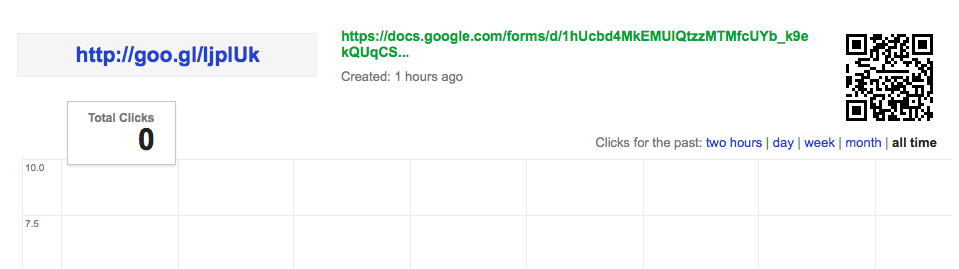
I love the fact that is keeps track of all of the URLs that I shorten.  I also love the fact that it quickly, and automatically, creates a QR Code.  Goo.gl makes it very easy for me to create a form, shorten the URL, and collect data from people.  Here is a screen shot of the details for a recently shortened address.


Here is a quick tutorial, demonstrating how "goo.gl" easily shortens the address and provides your information.  Check it out and give it a try.


Sunday, April 20, 2014

HAPPY BIRTHDAY, FRANKI!

Just wanted to say "Happy Birthday" to the most wonderful person I know. Just wanted to acknowledge that this blog wouldn't exist if not for Franki. Thanks for the "pushing and prodding" to make me do it.

 My thoughts wouldn't be here - If Not For Franki!

 Happy Birthday!


 Scott

Friday, March 14, 2014

Google Apps Training Almost Finished

We are half-way through our third and final cycle of Google Apps for Education initial training for teachers.  We have already trained in Drive basics and Calendar basics, and are now finishing up GMail basics.  It is an exciting time for our staff (a little nerve-racking, as well).  Teachers and staff are starting to see some of the real power in Google, and we haven't even spent much time looking at the advanced applications of Apps.  The future is bright.

Our mail changeover date is less than 1 month away.  We are in the process of creating district-wide calendars, resources, and groups.  The migration seems slow, but deliberate.  I think that because we are so deliberate, we are finding that the staff appreciates the efforts we are putting forth in training them to use the different pieces.  We introduce them to an aspect of Google Apps, and then give them time to work with that.  Then, we come back with another App, etc.

We have also provided many ways for our staff to learn.  We have done in-building, face-to-face trainings, created a packet of training tutorials, and created video tutorials that they can access when they have time.  By providing the resources in many formats, we give them different ways to process the information, as well as resources to go back and reference if more info is needed.  We have also put everything onto a wiki that is accessible from anywhere - Google Training Wiki.  Here is a video from our third training component - GMail Basics.


This has been an interesting process, and am really looking forward to being able to see it go "live".  I am really excited to see how our teachers start to utilize the power of Google Apps for Education, both with each other and with their students.

Sunday, March 9, 2014

Google Forms at Central OEA/NEA Leadership Conference

I got the opportunity to spend the afternoon at the Central Ohio OEA/NEA Leadership Conference.  We spent a couple of hours talking about Google Forms and how you could use Google Forms to help with Formative Assessment.  Forms makes it very easy to collect, organize, summarize and share data.  I shared some examples and we discussed some ideas with participants.

Here is my presentation.  It shares some steps to create Forms, as well as some ideas on how to share the data.  A couple of things that I use with Forms are Flubaroo, a script to grade assessments collected in a spreadsheet, and Wordle or Tagxedo, word cloud generators.

I am always happy to share what I know, but seem to learn a few things new each time I work with a group.  Google Apps are so powerful and helpful that teachers seem to always find new ways to use them.

Keep Googling!


Tuesday, February 11, 2014

Introduction to Google Apps for Education

Today, we started training buildings.  Google Apps for Education for the Dublin City Schools.  How exciting for teachers and students.  Teachers are getting their accounts, learning how to log in, seeing what will be available and being introduced to Google Documents.  What a huge spectrum of learners.  Some are users of Google Apps and others have never logged into a Google Account.

They are just floored when they see that you can type in a document at the same time as another user. Wow.  You can see the teachers thinking of ways to use this in the classroom.  It is going to be outstanding to see this roll out.  Hopefully, they will not try to jump in too quickly.  Apps accounts are up and running, but mail is not flowing in until after Spring Break.

Here are a couple videos that teachers can watch if they want to see more info, or they could not make it to their building's session #1 training.

Intro to Google Apps


Intro to Google Documents and Basic Sharing

Monday, February 3, 2014

Quick Introduction to Google Apps for Education

Our district has recently decided to go Google.  I couldn't be more happy and excited.  Google Apps for Education will allow teachers (and students - soon) to be able to collaborate, share, and easily access their information.  Gmail, Calendars, Drive, Groups - easily shared with each other and easily accessed on any device with web access.  How great is that?  I think it will make a huge difference in how we do our day-to-day work.

Here is a quick commercial about Google Apps for Education for those that aren't all "Googly", like me.


Sunday, February 2, 2014

Great iPad Apps for the Classroom - Part II

Here is Part II of a list of iPad Apps that my colleagues and I recommend for classroom iPads.  These are excellent Apps for creating and sharing.  Give them a try.  They are very easy to use and figure out.  We also suggest these Apps to parents for their kids.  We are not into skill and drill, we prefer making things.  These are a good place to start.  Many of them work on an iPhone or iPod, as well.


App Icon
Description     and  single-copy price/volume price - 20 or more
Baiboard is an ipad app that allows you to create, share and collaborate on your education content.  It allows for zoomable multi-page whiteboard, collaborative annotation on PDF docs, and screen sharing from iPad to web browser.  Free

Qrafter (Crafter) is a two-dimensional barcode scanner for iPhone, iPad and iPod Touch. Its main purpose is to scan and parse the contents of QR Codes.  Free

Feltz allows you to create pictures from over 550 felt graphics to play with. So if you want to make a farm, a monster flying a plane, dinosaurs and frogs on skateboards or a simple flower, your imagination is the limit.  $.99/$.49

Comic Life, the award winning photo comic creation software, is the funnest, easiest and fastest way ever to create photo comics on a mobile device. Your comics come to life with our integrated reader on brilliant iOS displays. Easily go from taking photos to creating full comics all on one device with full page templates and panel layouts.  $4.99/$2.49
Hopscotch teaches kids to code using simple, intuitive building blocks. Kids can create games, animations and other programs in this colorful, interactive environment.  Free

Daisy the Dinosaur! is a free, fun app that has an easy drag and drop interface that kids of all ages can use to animate Daisy to dance across the screen. Kids will intuitively grasp the basics of objects, sequencing, loops and events by solving this app's challenges.  Free

Skitch is an app that will help you show how you feel instead of writing about it. Snap it, mark it, and send it on. Capture a photo and make a friend laugh with you or inspire a student by labeling the insides of a robot. Impress your boss with a snap of the white board with her comments right after the meeting finishes.  Free

Drawing Box Free is the most suitable app to learn and practice drawing and painting. With responsive smooth pencil and brush strokes, graphical and intuitive interface, you can use it to make a quick sketch or a detailed study on the go.   Free

Voice Record Pro is a professional voice recorder. It allows you to record voice memos and on-site sounds at unlimited length with configurable quality.  Recorded voices are in standard AAC/MP4/M4A format. They can be converted to MP3 and can be saved in various places.  Free

Light-bot is a programming puzzle game: a puzzle game that uses game mechanics that are firmly rooted in programming concepts.  Light-bot LITE lets players gain a practical understanding of basic concepts like writing instruction sequences and procedures, just by guiding a robot with commands to light up tiles and solve levels.  Free

Popplet is a platform for your ideas. Popplet's super simple interface allows you to move at the speed of your thoughts. With Popplet you can capture your ideas and sort them visually in realtime. Quickly and easily!  Free

My WebDav can turn your iPhone, ipad, ipod into WebDav client, download files from WebDav server and upload files into WebDav server.  Free

Book Creator is the simple way to create your own beautiful iBooks, right on the iPad. Read them in iBooks, send them to your friends, or submit them to the iBookstore.  Ideal for children’s picture books, photo books, art books, cook books, manuals, textbooks, and the list goes on.  $4.99/$2.49
Google Drive is one safe place for all your stuff. Upload photos, videos, documents, and other files that are important to you, then access what you need wherever you go, on any device.   Free