I was fortunate enough to be able to share on the topic of formative assessment and how Google Forms can be used to collect, analyze, and share the information with staff and students. It's always fun to share how powerful Google Forms are for teachers. Here is my presentation.
Thursday, May 15, 2014
Formative Assessment and Google Forms
Recently, I attended ITIP Ohio Google Summit in Sandusky, Ohio. It was a conference of over 700 teachers and administrators from all over the state, and beyond. It was a two-day conference focusing on Google Apps for Education and how it can be utilized in schools.


Wednesday, May 14, 2014
ITIP Ohio Summit Roundup
ITIP Ohio Summit took place this past Monday and Tuesday, in Sandusky, Ohio at the Kalahari Resort and Convention Center. The focus of the Summit was Google Apps for Education. Many sessions were given over the two days. The Conference was hashtagged at #ITIP14, if you'd like to go see what was said. The programs are here.
Day 1 - Pre-Conference
Day 2 - Conference
Sessions I attended were:
Dusty Miller, of WGTE Public Media, presented on the development of Chrome. She talked about the features and benefits of Chrome. She mentioned some great Chrome Apps and Extensions. She also talked about some of the benefits of using Chrome with Google Drive.
Her presentation materials are here - http://tinyurl.com/l243p47
Boomerang for GMail in Chrome - Bill Mooney - so you can schedule emails
Field Trip App for iOS and Android - Dusty Miller - adds Google Info to your current location
PearDeck - John Sowash - An interactive presentation app - "keep you audience engaged"
NearPod - Marcia Kish - An interactive presentation app - "keep you audience engaged"
Jam for Chrome - Marcia Kish - App to create music in Chrome
Chromie is Your Homie - Ryan MacRaild - cool features of Chrome - http://goo.gl/I6drnF
Calendar - Labs - Mary Ann Falk - Explored some different labs in Google Calendar
Anticipated Preview of Google Classroom - Carrie Rathsack - http://www.google.com/edu/classroom/
Google Sheets - Anthony Luscre - Conditional spreadsheet applications
Their presentation is linked here - Google Apps: It's Elementary! Presentation and Survey
Lisa Johnson-Bowers and Darlene Adamson, from Mentor, presented on many ways to use Google Forms. They provided a lot of examples of how you could use forms and even demonstrated how to create a form. One big feature I liked was the demonstration of how to create a "conditional" survey.
Their presentation is linked here - http://goo.gl/A7VpHj
Eric Curts, Tech Integration Specialist for SPARCC, presented how Admins can write scripts and rules to allow mail to flow in and out of your organization. He shared many features to help be specific about which members can send and receive email from different groups.
His presentation materials are here - http://www.appsusergroup.org/presentations/email-security
These two days have been outstanding.
If you are a GAFE user, you should make a point to attend next year.
Day 1 - Pre-Conference
Day 2 - Conference
Sessions I attended were:
The Chrome-an Empire: In the 21st Century
Dusty Miller, of WGTE Public Media, presented on the development of Chrome. She talked about the features and benefits of Chrome. She mentioned some great Chrome Apps and Extensions. She also talked about some of the benefits of using Chrome with Google Drive.
Her presentation materials are here - http://tinyurl.com/l243p47
Google SLAM
Many presenters talked about cool apps:Boomerang for GMail in Chrome - Bill Mooney - so you can schedule emails
Field Trip App for iOS and Android - Dusty Miller - adds Google Info to your current location
PearDeck - John Sowash - An interactive presentation app - "keep you audience engaged"
NearPod - Marcia Kish - An interactive presentation app - "keep you audience engaged"
Jam for Chrome - Marcia Kish - App to create music in Chrome
Chromie is Your Homie - Ryan MacRaild - cool features of Chrome - http://goo.gl/I6drnF
Calendar - Labs - Mary Ann Falk - Explored some different labs in Google Calendar
Anticipated Preview of Google Classroom - Carrie Rathsack - http://www.google.com/edu/classroom/
Google Sheets - Anthony Luscre - Conditional spreadsheet applications
Google Apps: It's Elementary!
Shahnyn Moody-Benedict and Angela Maxwell presented on how they use Google Apps for Education in the elementary school. They are media specialists and work with staff and students to use Google Apps to accomplish many tasks.Their presentation is linked here - Google Apps: It's Elementary! Presentation and Survey
50+ Uses of Google Forms & How to Create Them
Lisa Johnson-Bowers and Darlene Adamson, from Mentor, presented on many ways to use Google Forms. They provided a lot of examples of how you could use forms and even demonstrated how to create a form. One big feature I liked was the demonstration of how to create a "conditional" survey.
Their presentation is linked here - http://goo.gl/A7VpHj
Making GMail Safe for Schools
Eric Curts, Tech Integration Specialist for SPARCC, presented how Admins can write scripts and rules to allow mail to flow in and out of your organization. He shared many features to help be specific about which members can send and receive email from different groups.
His presentation materials are here - http://www.appsusergroup.org/presentations/email-security
These two days have been outstanding.
If you are a GAFE user, you should make a point to attend next year.
Tuesday, May 6, 2014
Shorten Your URLs with "goo.gl"
Have you ever needed to shorten an extra-long URL? I do all the time. Now that I am using Google Forms frequently, I am always needing to shorten them. I have tried many and there are some benefits to others, but I have started to use "goo.gl" as my go-to shortener.
I love the fact that is keeps track of all of the URLs that I shorten. I also love the fact that it quickly, and automatically, creates a QR Code. Goo.gl makes it very easy for me to create a form, shorten the URL, and collect data from people. Here is a screen shot of the details for a recently shortened address.
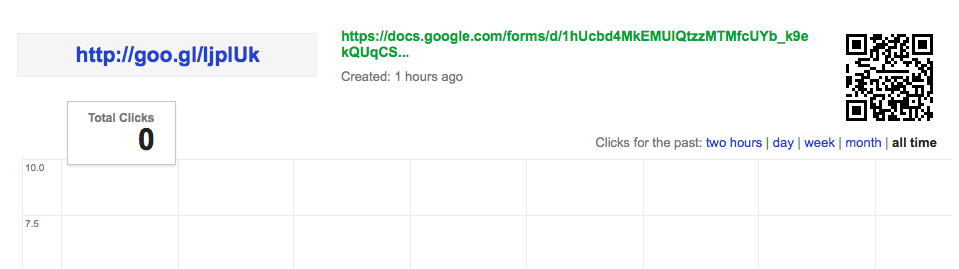
Here is a quick tutorial, demonstrating how "goo.gl" easily shortens the address and provides your information. Check it out and give it a try.
I love the fact that is keeps track of all of the URLs that I shorten. I also love the fact that it quickly, and automatically, creates a QR Code. Goo.gl makes it very easy for me to create a form, shorten the URL, and collect data from people. Here is a screen shot of the details for a recently shortened address.
Here is a quick tutorial, demonstrating how "goo.gl" easily shortens the address and provides your information. Check it out and give it a try.
Sunday, April 20, 2014
HAPPY BIRTHDAY, FRANKI!

My thoughts wouldn't be here - If Not For Franki!
Happy Birthday!
Scott
Friday, March 14, 2014
Google Apps Training Almost Finished
We are half-way through our third and final cycle of Google Apps for Education initial training for teachers. We have already trained in Drive basics and Calendar basics, and are now finishing up GMail basics. It is an exciting time for our staff (a little nerve-racking, as well). Teachers and staff are starting to see some of the real power in Google, and we haven't even spent much time looking at the advanced applications of Apps. The future is bright.
Our mail changeover date is less than 1 month away. We are in the process of creating district-wide calendars, resources, and groups. The migration seems slow, but deliberate. I think that because we are so deliberate, we are finding that the staff appreciates the efforts we are putting forth in training them to use the different pieces. We introduce them to an aspect of Google Apps, and then give them time to work with that. Then, we come back with another App, etc.
We have also provided many ways for our staff to learn. We have done in-building, face-to-face trainings, created a packet of training tutorials, and created video tutorials that they can access when they have time. By providing the resources in many formats, we give them different ways to process the information, as well as resources to go back and reference if more info is needed. We have also put everything onto a wiki that is accessible from anywhere - Google Training Wiki. Here is a video from our third training component - GMail Basics.
This has been an interesting process, and am really looking forward to being able to see it go "live". I am really excited to see how our teachers start to utilize the power of Google Apps for Education, both with each other and with their students.
Our mail changeover date is less than 1 month away. We are in the process of creating district-wide calendars, resources, and groups. The migration seems slow, but deliberate. I think that because we are so deliberate, we are finding that the staff appreciates the efforts we are putting forth in training them to use the different pieces. We introduce them to an aspect of Google Apps, and then give them time to work with that. Then, we come back with another App, etc.
We have also provided many ways for our staff to learn. We have done in-building, face-to-face trainings, created a packet of training tutorials, and created video tutorials that they can access when they have time. By providing the resources in many formats, we give them different ways to process the information, as well as resources to go back and reference if more info is needed. We have also put everything onto a wiki that is accessible from anywhere - Google Training Wiki. Here is a video from our third training component - GMail Basics.
This has been an interesting process, and am really looking forward to being able to see it go "live". I am really excited to see how our teachers start to utilize the power of Google Apps for Education, both with each other and with their students.
Sunday, March 9, 2014
Google Forms at Central OEA/NEA Leadership Conference
I got the opportunity to spend the afternoon at the Central Ohio OEA/NEA Leadership Conference. We spent a couple of hours talking about Google Forms and how you could use Google Forms to help with Formative Assessment. Forms makes it very easy to collect, organize, summarize and share data. I shared some examples and we discussed some ideas with participants.
Here is my presentation. It shares some steps to create Forms, as well as some ideas on how to share the data. A couple of things that I use with Forms are Flubaroo, a script to grade assessments collected in a spreadsheet, and Wordle or Tagxedo, word cloud generators.
I am always happy to share what I know, but seem to learn a few things new each time I work with a group. Google Apps are so powerful and helpful that teachers seem to always find new ways to use them.
Keep Googling!
Here is my presentation. It shares some steps to create Forms, as well as some ideas on how to share the data. A couple of things that I use with Forms are Flubaroo, a script to grade assessments collected in a spreadsheet, and Wordle or Tagxedo, word cloud generators.
I am always happy to share what I know, but seem to learn a few things new each time I work with a group. Google Apps are so powerful and helpful that teachers seem to always find new ways to use them.
Keep Googling!
Tuesday, February 11, 2014
Introduction to Google Apps for Education
Today, we started training buildings. Google Apps for Education for the Dublin City Schools. How exciting for teachers and students. Teachers are getting their accounts, learning how to log in, seeing what will be available and being introduced to Google Documents. What a huge spectrum of learners. Some are users of Google Apps and others have never logged into a Google Account.
They are just floored when they see that you can type in a document at the same time as another user. Wow. You can see the teachers thinking of ways to use this in the classroom. It is going to be outstanding to see this roll out. Hopefully, they will not try to jump in too quickly. Apps accounts are up and running, but mail is not flowing in until after Spring Break.
Here are a couple videos that teachers can watch if they want to see more info, or they could not make it to their building's session #1 training.
Intro to Google Apps
Intro to Google Documents and Basic Sharing
They are just floored when they see that you can type in a document at the same time as another user. Wow. You can see the teachers thinking of ways to use this in the classroom. It is going to be outstanding to see this roll out. Hopefully, they will not try to jump in too quickly. Apps accounts are up and running, but mail is not flowing in until after Spring Break.
Here are a couple videos that teachers can watch if they want to see more info, or they could not make it to their building's session #1 training.
Intro to Google Apps
Intro to Google Documents and Basic Sharing
Subscribe to:
Posts (Atom)