Below are some people you might want to follow on Twitter. I had the opportunity to see and hear these people talk at BLC11 in Boston. They spoke on various topics regarding education and technology. They are:
Garth Holman - @garthholman - online textbook and collaborating from a distance - blog
Mike Pennington - @professormike1 - online textbook and collaborating from a distance - blog
Jon Bergmann - @jonbergmann - flipped classrooms - ning
Aaron Sams - @chemicalsams - flipped classrooms- ning
Chris Bell - @cbell619 - google docs for collaboration - web info
Marco Torres - @torres21 - using technology to engage students - web info
Jeff Utecht - @jutecht - using QR codes in schools - blog
Angela Maiers - @angelamaiers - social networking and web 3.0 - web info
Rob Evans - dealing with change in schools - web info
Kathy Cassidy - @kathycassidy - digital portfolios - blog
Seth Bowers - @sethbowers - student tools for collaboration - blog
If you get a chance, read the material these people write about or see them in the future. They have good insights into helping students succeed. Their ideas are good and materials are helpful.
Saturday, July 30, 2011


Friday, July 29, 2011
Screen Chomp

Screen Chomp is a new piece of free software that is out for the iPad. TechSmith Corp has developed this software to help make it very easy to capture work off of an iPad. You can record writing and audio to create videos of your work, creating a screencast of what was happening. Screencasting is an outstanding way to create tutorials for sharing what you learn and know.
Using Screen Chomp, you have the ability to change text color, display photos that are on your iPad, and easily save the video. It also has the ability to send directly to Facebook. It is a new piece of software and the developers are looking for feedback. Students have found this software easy to use to demonstrate what they know - allowing them to share with other students.
Monday, July 18, 2011
ShowMe App

A few of our teachers at school are going to use iPads in class. They are going to use the iPads to control their LCD projectors and whiteboards. I will write about that process as it unfolds, but today I want to share with you an app that I just found and have been playing with. It is the the app called ShowMe. It is an app that allows the iPad user to write on the iPad and record what is written, as well as any audio that you provide while working.

On the left-hand side of the page, you can see that you have a pencil tool, an erase tool, a clear-screen tool, and a picture insertion tool. You can choose pencil colors. And at the bottom of the page is a record button, so you can record what is written on the page. It also records the audio so you can describe what is taking place. This is outstanding for recording tutorial work. It would also be an excellent way for students to demonstrate their understanding. They can do the work and explain as they go. You can save the recording for sharing later with other students.

Once you record your video, you can upload it to ShowMe's website. You will be given the choice of making it public or private. If private, you'll be able to share it with a link. If public, anyone on the ShowMe website would be able to search and find it.

You can title the video, provide a description, and also keyword tag it for future reference.

As you can see here, you can share it on facebook, twitter, or email. I think that this application may prove helpful and easy-to-use for teachers to create tutorials for their students. Give it a try.
Saturday, June 11, 2011
Building a Master Schedule
We just finished building our master schedule. It is quite a process, and one that if completed conscientiously, can make a big difference as to how many students can really get the classes they want and need. Usually, this process is done with a month or so of school to go, so that schedule conflicts can be worked out. This year, due to budget issues - which led to staffing issues, we were put on hold. We have never built a schedule this late.
We use a process that was developed by Pearson. They run workshops to train school administration and support groups how to build schedules so that a maximum number of students can schedule with no conflicts. We have 1200 or so students, so conflicts will be an issue, especially when you offer IB and AP courses. It is a fun "puzzle" to put together. We use scheduling boards and scheduling chips to help with the process. You can see them below.
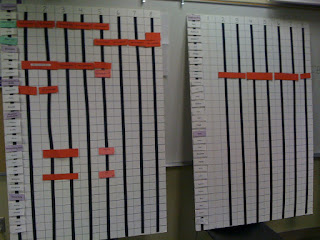
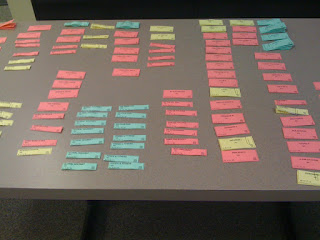
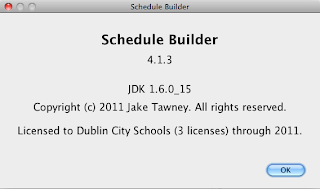
For the past couple of years, we have been fortunate enough to use a computer program to help us with this process. A teacher from a neighboring school district developed his Schedule Builder program, and it has cut more than a day's worth of time off the process. I would like to say thanks to Jake Tawney. If you would like to see his product, contact him. It is really easy to use and saves a lot of tedious work. Thanks, Jake. This program is worth every penny.
I am glad that I am part of the process. It is a challenge that really adds to the school year, but people don't realize what goes on. If you get a chance to work with your administrative team on building a master schedule, you should try it. Our team consisted of principals, guidance staff, special education staff, science department members (room issues abound in the science department), IB coordinator, and others.
We use a process that was developed by Pearson. They run workshops to train school administration and support groups how to build schedules so that a maximum number of students can schedule with no conflicts. We have 1200 or so students, so conflicts will be an issue, especially when you offer IB and AP courses. It is a fun "puzzle" to put together. We use scheduling boards and scheduling chips to help with the process. You can see them below.


I am glad that I am part of the process. It is a challenge that really adds to the school year, but people don't realize what goes on. If you get a chance to work with your administrative team on building a master schedule, you should try it. Our team consisted of principals, guidance staff, special education staff, science department members (room issues abound in the science department), IB coordinator, and others.
Tuesday, June 7, 2011
Dublin Tech Camp 2011
Almost 100 teachers gave up two days of summer vacation to come to Tech Camp 2011. My technology colleagues and I had the opportunity to work with teachers on various topics and activities. The morning was filled with presentations, and the afternoon provided time for teachers to work together in small groups on different projects of their own interest. I was privileged to be able to present on two great topics.
I worked with Beth Politz and Joanna Doyle to present on Synchronous Communications - Skype, iChat, and Elluminate. All 3 are available for teachers to use from school. We showed teachers how these programs worked and gave them ideas of how each could be used with their students.
The other sessions I presented were on Web 2.0 Tools for Teachers. I got to present this twice, and both times the turnout was wonderful. Teachers were eager to hear about Twitter, Google Apps, Blogger, Flickr, Shelfari, and other free online applications. I have posted this presentation here - http://scottsibberson.blogspot.com/p/presentation.html. You can view the presentation here, as well as other resources that were used.
Thanks to all teachers that showed the interest to attend. Keep working and "playing". It doesn't come easy.
Sunday, June 5, 2011
iChromy
Where have I been for months? What a busy spring! Plus, I've been playing with a new iPad. We'll save that post for a later date. WOW - it may be a game-changer. But let's get back to today's topic - iChromy. iChromy is available at the iTunes Store.

iChromy is a web browser application created by Diigo for the iPad. It's free and easy to use and there are a couple of features that are outstanding.
First, the ability to forward a webpage to your others accounts is quite easy to setup and easy to execute. iChromy will attach to your Twitter, Facebook, Diigo, Google Reader, and more. It will also allow your to sent the URL via e-mail to others. I find this very helpful as I am gathering resources to share with other people. To have all of my account just one click away is extremely helpful.
The other feature that I find helpful, is the feature of saving a website for later reading - offline. There is a "glasses" button that allows you to save a website. You can then access the information from that website at a later time, even if you are not connected to the web. This is quite helpful if you are going to be in a car or on a plane, where internet access is limited. You can load up some of those articles you want to read for a later time, then just delete them when you are done.
I would recommend that you try iChromy. You will find it easy to use and quite a nice time saver.
iChromy is a web browser application created by Diigo for the iPad. It's free and easy to use and there are a couple of features that are outstanding.
First, the ability to forward a webpage to your others accounts is quite easy to setup and easy to execute. iChromy will attach to your Twitter, Facebook, Diigo, Google Reader, and more. It will also allow your to sent the URL via e-mail to others. I find this very helpful as I am gathering resources to share with other people. To have all of my account just one click away is extremely helpful.
The other feature that I find helpful, is the feature of saving a website for later reading - offline. There is a "glasses" button that allows you to save a website. You can then access the information from that website at a later time, even if you are not connected to the web. This is quite helpful if you are going to be in a car or on a plane, where internet access is limited. You can load up some of those articles you want to read for a later time, then just delete them when you are done.
I would recommend that you try iChromy. You will find it easy to use and quite a nice time saver.
Sunday, March 13, 2011
More than Bracketology
NCAA Tournament brackets are everywhere. It seems like everyone is doing it. Some play for money, some play for fun, some play for personal pride. I love that Mike Greenberg and Mike Golic bet on one sheet they call the "Sheet of Integrity." I have found less desire to fill out many brackets (even though I have run many in the past) and more desire to try just one and compare with friends, just for bragging rights. I just love this time of year for college basketball how teams play when they get to their conference tournaments, with the possibility of making the NCAA Tournament. I can't turn it off. I call it research....
By research, I really mean research. My real contest this time of year combines the excitement of the March Madness Bracket and fantasy sports. My friends and I get together and conduct a fantasy draft of players involved in the NCAA Tournament (one of our players is connecting by Skype, due to the fact that he is out of town). We draft 10 players for our individual teams. The team that scores the most total points in the tournament wins. We use Googe Docs to share the results - the spreadsheet is there for people to keep up with scoring throughout the tournament. Yes, it is quite competitive. And there is a lot of smack talk, but, my team involves a lot of research and data collection.
Data? Yes, data. I have compiled a list of over 150 players that will be involved in the "big dance." I have also collected the stats involving their points per game average. Spreadsheets (thanks Google Docs) involving that data and also the anticipation of how many games they will play. This is where the bracket comes into play. You have to be able to predict a team's success, to be able to select their players for your team. So you crunch numbers to establish a draft order for the big night. Do you take high-scoring players in a few games, or a medium-scoring player in a lot of games? That is where different people take risks. I tend to side with players that play a lot of games.
What data is most important? Some select by taking players from their favorite teams. Some select from the teams that they feel will advance the farthest. Some select from teams that are hot, while I try to take the scientific direction. What players score big on teams that will play the most games. I hope that my buddies don't pick all of my top players. I try not to deviate, but draft trends sometimes cause me to leave my sheet, just so I don't get blocked out of teams that I want to cheer for. I love my local Buckeyes, and always cheer for the Tarheels. The key players for our competition often come from the Cinderella teams that advance when unsuspected. Last year, Butler and Gordon Hayward took me deep into the Tournament.
So, do you pick players that score a ton? Or, do you take players that should play a lot of games? That is what makes our draft fun and competitive. There is so much more you can do than just fill out a bracket. I will spend a lot of time over the next day or two making some decisions in establishing my draft order. I hope I don't choose players that end up on an upset team or a player that is on the injured list (did that a couple of years ago - oooops!). I know it will be fun, interesting, and keep us interested in the whole tournament, even if the teams we cheer for are ousted. Have fun with your bracket. I will.
By research, I really mean research. My real contest this time of year combines the excitement of the March Madness Bracket and fantasy sports. My friends and I get together and conduct a fantasy draft of players involved in the NCAA Tournament (one of our players is connecting by Skype, due to the fact that he is out of town). We draft 10 players for our individual teams. The team that scores the most total points in the tournament wins. We use Googe Docs to share the results - the spreadsheet is there for people to keep up with scoring throughout the tournament. Yes, it is quite competitive. And there is a lot of smack talk, but, my team involves a lot of research and data collection.
Data? Yes, data. I have compiled a list of over 150 players that will be involved in the "big dance." I have also collected the stats involving their points per game average. Spreadsheets (thanks Google Docs) involving that data and also the anticipation of how many games they will play. This is where the bracket comes into play. You have to be able to predict a team's success, to be able to select their players for your team. So you crunch numbers to establish a draft order for the big night. Do you take high-scoring players in a few games, or a medium-scoring player in a lot of games? That is where different people take risks. I tend to side with players that play a lot of games.
What data is most important? Some select by taking players from their favorite teams. Some select from the teams that they feel will advance the farthest. Some select from teams that are hot, while I try to take the scientific direction. What players score big on teams that will play the most games. I hope that my buddies don't pick all of my top players. I try not to deviate, but draft trends sometimes cause me to leave my sheet, just so I don't get blocked out of teams that I want to cheer for. I love my local Buckeyes, and always cheer for the Tarheels. The key players for our competition often come from the Cinderella teams that advance when unsuspected. Last year, Butler and Gordon Hayward took me deep into the Tournament.
So, do you pick players that score a ton? Or, do you take players that should play a lot of games? That is what makes our draft fun and competitive. There is so much more you can do than just fill out a bracket. I will spend a lot of time over the next day or two making some decisions in establishing my draft order. I hope I don't choose players that end up on an upset team or a player that is on the injured list (did that a couple of years ago - oooops!). I know it will be fun, interesting, and keep us interested in the whole tournament, even if the teams we cheer for are ousted. Have fun with your bracket. I will.
Subscribe to:
Posts (Atom)