Another Dublin Literacy Conference has come and gone. It was an outstanding day of learning and sharing. Check out the twitter conversations at #dublit12. The day couldn't have gone better. Here is the presentation that I was fortunate enough to share with teachers at the conference.
Sunday, February 26, 2012


Wednesday, February 15, 2012
ETech 2012 Wrapup
Over the last 3 days, I've been fortunate enough to be able to attend Ohio's ETech Conference in Columbus. I was able to attend many wonderful sessions and spend time with my technology colleagues. I was also able connect with a few of my Twitter tech friends that were in attendance. Now it's time to analyze what I saw and see what we can use/share with our teachers. Here is some of what I saw.
Teaching Writing in the 21st Century Classroom
Presented by Matt Gillispie. He and a couple of his colleagues shared different tools and websites that helped with the teaching of writing. Key tools shared-
Neatchat.com
Puppet Pals for the iPad
Socrative.com
Screenr.com
Voicethread
Edmodo.com
Schoology.com
A Keynote Address given by Dr. Michio Kaku
speech similar to this one on YouTube
Students Leaving a Legacy: A Student Created Digital Wiki-textbook
Garth Holman and Mike Pennington talk about their digital textbook and collaborating on the project with their students. Here is the link to their digital text.
Google Forms for Everything!
Eric Curts of North Canton City Schools talked about the uses of Google Forms - presentation link here
It Takes a Village: Innovative Ways to Collaborate
Holly Harwood shared many ways teachers can collaborate to help learn and share techniques and materials for class. Her presentation was shared on their wiki.
Jump into the Cloud, Google Apps for Eudcation Edition for your SchoolAnthony Luscre, Mogadore Local Schools
Link to his presentation.
He also has presentation and tech materials available at http://searchfindknow.com
Also attended his session entitled
Creating District, Building, Classroom and/or Student Websites using WeeblyLink to the presentation.
A Keynote Address given by Brene Brown, entitled Teachable Moments: Bringing Courage, Compassion and Connection to the Classroom. The Keynote was outstanding. She has given multiple Ted Talks. You might like to see them. Try this one.
http://www.ted.com/talks/brene_brown_on_vulnerability.html
As you can see, there was a variety of information to absorb and process. That's my goal over the next few weeks. Check out these resources and see if any are right for you.
Teaching Writing in the 21st Century Classroom
Presented by Matt Gillispie. He and a couple of his colleagues shared different tools and websites that helped with the teaching of writing. Key tools shared-
Neatchat.com
Puppet Pals for the iPad
Socrative.com
Screenr.com
Voicethread
Edmodo.com
Schoology.com
A Keynote Address given by Dr. Michio Kaku
speech similar to this one on YouTube
Students Leaving a Legacy: A Student Created Digital Wiki-textbook
Garth Holman and Mike Pennington talk about their digital textbook and collaborating on the project with their students. Here is the link to their digital text.
Google Forms for Everything!
Eric Curts of North Canton City Schools talked about the uses of Google Forms - presentation link here
It Takes a Village: Innovative Ways to Collaborate
Holly Harwood shared many ways teachers can collaborate to help learn and share techniques and materials for class. Her presentation was shared on their wiki.
Jump into the Cloud, Google Apps for Eudcation Edition for your SchoolAnthony Luscre, Mogadore Local Schools
Link to his presentation.
He also has presentation and tech materials available at http://searchfindknow.com
Also attended his session entitled
Creating District, Building, Classroom and/or Student Websites using WeeblyLink to the presentation.
A Keynote Address given by Brene Brown, entitled Teachable Moments: Bringing Courage, Compassion and Connection to the Classroom. The Keynote was outstanding. She has given multiple Ted Talks. You might like to see them. Try this one.
http://www.ted.com/talks/brene_brown_on_vulnerability.html
As you can see, there was a variety of information to absorb and process. That's my goal over the next few weeks. Check out these resources and see if any are right for you.
Wednesday, February 1, 2012
Dublin Literacy Conference 2012
Getting ready for the Dublin Literacy Conference. Preparations have begun on a presentation about Web 2.0 Tools for teachers to help with literacy. I am creating a collection of tools with examples of how they can be used in the classroom. How can teachers and students learn and demonstrate learning using those tools. I will share it here once the conference has occurred.
Here is the link to the conference, if you are in the Columbus area and looking for a great way to spend a Saturday.

Saturday, Feb. 25, 2012
Dublin Coffman High School
Here is the link to the conference, if you are in the Columbus area and looking for a great way to spend a Saturday.
Dublin Coffman High School
Online Graphing Calculator
I recently ran across a graphing calculator online. It is very easy to navigate and allows the user to share the graphs they create. It is a product of Desmos. Within a couple of days, they had upgraded to a product that allows the user to create an account to save and share the graphs that they create, abettercalculator. This is awesome. Here is what the website looks like.
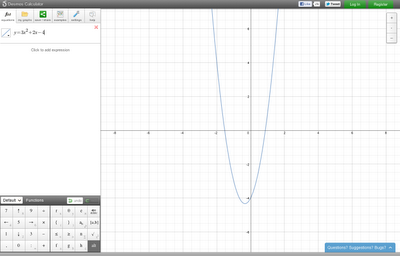
Along the left side, you get to enter equations, points, etc. It has a keypad, so you can choose numbers, letters, functions, etc. These are all browser based, which makes it very easy to navigate on an Interactive White Board. I think teachers will love this.
As I mentioned before, a logged-in user can save graphs into a folder, share the link to the graph, or save an image of the graph in .png format. It even allows the user to tweet out the result of the graph.
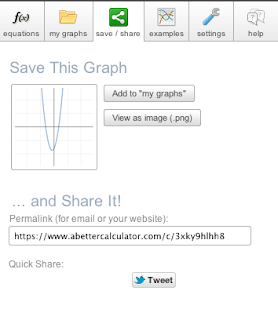

Along the left side, you get to enter equations, points, etc. It has a keypad, so you can choose numbers, letters, functions, etc. These are all browser based, which makes it very easy to navigate on an Interactive White Board. I think teachers will love this.
As I mentioned before, a logged-in user can save graphs into a folder, share the link to the graph, or save an image of the graph in .png format. It even allows the user to tweet out the result of the graph.

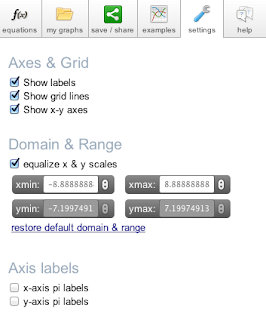
Another great feature is the customizable settings of the graph. You have control over the x-axis, y-axis, scales, etc. You can even use pi as a label. Nice for trigonometry. Give the page a try. It is probably a page you'll come back to frequently.

Tuesday, October 25, 2011
More QR Codes in Science
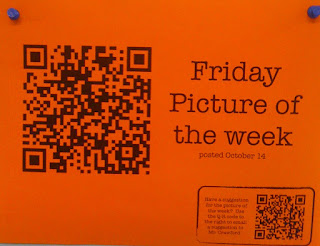
Our Physics teachers are using QR Codes with their students in a couple of ways that are pretty useful. First, they are using the QR Code to take the students to a "Friday Picture of the Week." This is a picture of some physics object that the students have either learned about or will learn about. Students are encouraged to submit photos that they find throughout their work.
Second, the teachers use QR Codes for the students to reference online assessments using the online source, Quizstar. The students can use their phones, laptops, or other device to take these assessments. The QR Code allows the students to avoid typing in long URLs. These Quizstar formative assessments then provide the teachers with data about the students and their knowledge of the subject.

The last way that the teachers are using QR Codes is on a calendar that is on a bulletin board outside their classroom. It has QR Codes that relate to the day's activities. Some codes are for Quizstar assessments, some are for videos (that are hosted on their class webpage), and some are for pdf files that the students may need. This makes it very easy for a student to find out what happened in class on a day they were absent.
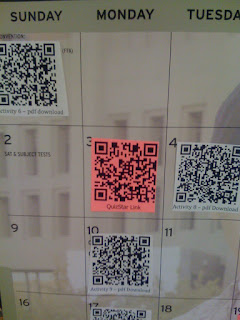
QR Codes are starting to pop up everywhere. How creative can you get? Incorporate them into your classroom.

Second, the teachers use QR Codes for the students to reference online assessments using the online source, Quizstar. The students can use their phones, laptops, or other device to take these assessments. The QR Code allows the students to avoid typing in long URLs. These Quizstar formative assessments then provide the teachers with data about the students and their knowledge of the subject.

The last way that the teachers are using QR Codes is on a calendar that is on a bulletin board outside their classroom. It has QR Codes that relate to the day's activities. Some codes are for Quizstar assessments, some are for videos (that are hosted on their class webpage), and some are for pdf files that the students may need. This makes it very easy for a student to find out what happened in class on a day they were absent.

QR Codes are starting to pop up everywhere. How creative can you get? Incorporate them into your classroom.
Sunday, October 23, 2011
Must Read for Teacher Leaders
If you work as a school leader, there is a new book that can really shed light on digital technology and social media. What School Leaders Need to Know About Digital Technologies and Social Media, edited by Scott McLeod and Chris Lehmann, brings together the thoughts of many leaders in educational technology. There are many chapters dedicated to different topics that teachers and leaders need to know about and start to utilize with their students. Each chapter gives some background information, then delves into some practical application of that topic, giving examples of how each is used in schools.
The chapters range from basic blogging and wikis to digital video, from virtual classrooms to one-on-one computing, from social bookmarking to Twitter, and much, much more. These chapters are written by some of my favorite educational technology "teachers." I am constantly learning from many of the people that contributed to this book, like:
Vicki Davis
Steve Dembo
Wesley Fryer
Will Richardson
Karl Fisch
Chris Lehmann
Dean Shareski
Richard Byrne
Miguel Guhlin
Alec Couros
Kevin Jarrett
Kim Cofino
David Jakes
Liz Kolb
Jeff Utecht
Ewan McIntosh
Check out the book, as well as the many resources it shares. There is definitely much to be learned from it. Every staff should have access to it. It is a quick read, but will provide thorough materials for the topics that you would like to investigate further.

The chapters range from basic blogging and wikis to digital video, from virtual classrooms to one-on-one computing, from social bookmarking to Twitter, and much, much more. These chapters are written by some of my favorite educational technology "teachers." I am constantly learning from many of the people that contributed to this book, like:
Vicki Davis
Steve Dembo
Wesley Fryer
Will Richardson
Karl Fisch
Chris Lehmann
Dean Shareski
Richard Byrne
Miguel Guhlin
Alec Couros
Kevin Jarrett
Kim Cofino
David Jakes
Liz Kolb
Jeff Utecht
Ewan McIntosh
Check out the book, as well as the many resources it shares. There is definitely much to be learned from it. Every staff should have access to it. It is a quick read, but will provide thorough materials for the topics that you would like to investigate further.
Tuesday, October 18, 2011
QR Code Bulletin Board
Our World Languages Department decided to incorporate QR Codes into their bulletin board. They surveyed their teachers and each submitted their favorite music videos from different countries. Then, they prepared a page on each artist (or group). So each page contains the name of the artist, the title of the song, a brief description, and a QR Code to the Youtube video of that song. Students and staff can use their QR readers to access that song. Pretty Cool. The photos below are from the whole bulletin board and one of the pages.


Subscribe to:
Posts (Atom)